

Appearance
Handling Errors in Workflow Services
When a platform service task in your workflow does not complete successfully, the workflow raises a BPMN error. You decide what happens next: catch the error and continue on an alternative path, or let it escape so it surfaces on the workflow's /result response.
Outcomes of a Platform Service Task
Every platform service task ends in one of two terminal outcomes. Only the unsuccessful one raises a BPMN error.
| Outcome | BPMN error? | BPMN error code | When it happens |
|---|---|---|---|
SUCCEEDED | no | — | The service returned a result. |
FAILED | yes | SERVICE_FAILED | The service reported a failure (validation error, runtime error, backend rejection). |
The Error Envelope
When a service-task error is raised, an envelope describing the failure travels with it. You read this envelope inside the recovery branch (as a per-host <hostId>_serviceError variable — see Accessing the Error Envelope Downstream), and API consumers see the same shape in the workflow's /result response when an error escapes uncaught.
json
{
  "errorCode":      "HUB_SERVICE_FAILED",
  "serviceId":      "<uuid of the platform service>",
  "applicationId":  "<uuid of the calling application>",
  "failedElement":  "<bpmn id of the platform task that failed>",
  "message":        "<short human description>",
  "response":       { /* the upstream service's verbatim response body */ }
}
Field rules:
errorCode,failedElement, andmessageare always present.errorCodeis one ofHUB_SERVICE_FAILED,WORKFLOW_ERROR, or a modeler-defined BPMN error code from a modeler-authored error end event.serviceIdandapplicationIdare present only forHUB_SERVICE_FAILED.responseis present only forHUB_SERVICE_FAILED; it carries the upstream service's verbatim response body (RFC 7807 problem+json plus any HAL fields the managed-service contract attaches).messageis derived via the fallback chainresponse.detail→response.title→response.message→ literal"Service execution failed", so it is always a non-empty string regardless of upstream shape.
Two error-code layers, different audiences
SERVICE_FAILED is the BPMN-level code BPMN uses internally to match catch handlers. HUB_SERVICE_FAILED is the envelope-level code your API consumers read off the /result body. They name the same thing in two different layers.
Reserved workflow output variable names
A handful of identifiers are reserved on workflow end-event output mappings because the runtime or the response shape already uses them at the same scope. An end-event target matching any of these names is rejected at deploy time with a 422 (ReservedOutputVariableException); the workflow-modeler also catches the collision inline as you type via a properties-panel validator and at lint time via the reserved-output-variable-name bpmnlint rule.
| Name | Why reserved |
|---|---|
executionId | PlatformWorkflowVariable constant the runtime injects into workflow scope; writing it would overwrite platform state. |
executionState | PlatformWorkflowVariable constant the runtime injects into workflow scope; writing it would overwrite platform state. |
serviceError | PlatformWorkflowVariable constant carrying the failure envelope on a caught path; writing it would overwrite platform state. |
triggeringTenantId | PlatformWorkflowVariable constant the runtime injects into workflow scope; writing it would overwrite platform state. |
errors | Failure-branch discriminator key on the workflow /result response root; an output named errors would silently miscategorise a successful response as a failure. |
_links | HAL sibling at the response root; an output named _links would overwrite the HAL link block at serialisation time. |
_embedded | HAL sibling at the response root; an output named _embedded would overwrite the HAL embedded block at serialisation time. |
Pick any other identifier — for example failure, errorInfo, errorDetails — when you want to surface the envelope on a recovery end event.
Catching an Error
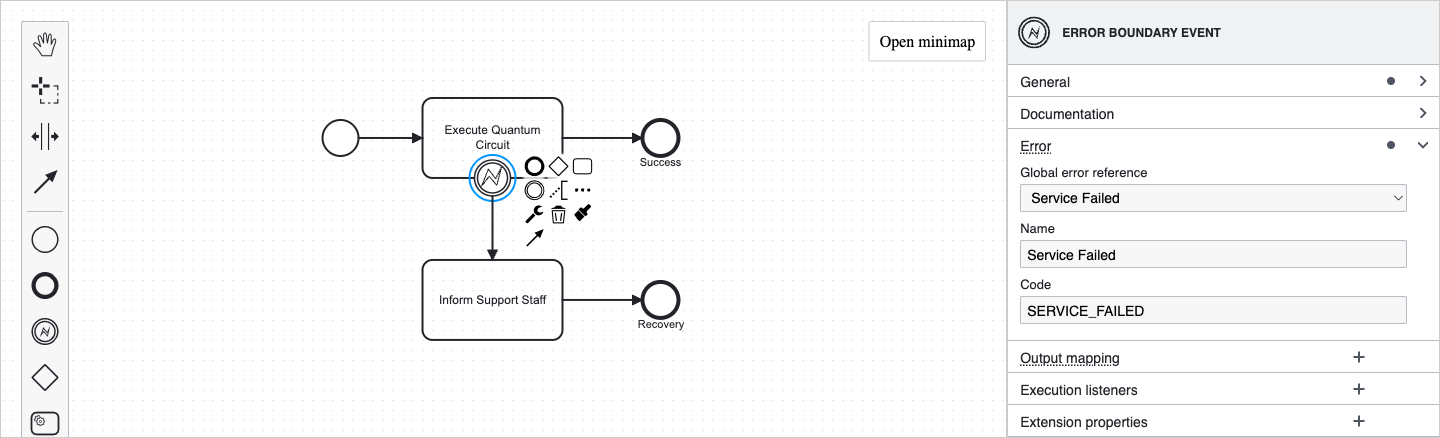
Attach a Boundary Error Event to a platform service task — that is the entire catch configuration.
The modeler automatically:
- creates or reuses a global error named Service Failed with code
SERVICE_FAILEDand wires the boundary's Error Reference to it, and - arranges for the platform to capture the failure envelope into a per-host process variable named
<hostId>_serviceErrorwhen the workflow is deployed.<hostId>is the BPMN id of the protected platform service task, for exampleActivity_QuantumSim_serviceError.
The only modelling work that remains is the recovery path that follows the boundary.
Customise the payload variable name
Select the boundary event to open its properties panel. Under the Error group, the Payload variable field shows the default name (<hostId>_serviceError) and lets you rename it to a friendlier identifier — for example coinTossError. Stick with the default unless you have a reason to override it; the default is unique per host so multi-boundary workflows are safe by construction. Names must use letters, digits, or _ only, and must start with a letter or _. No spaces, hyphens, dots, or $ — the variable is consumed in both JUEL (${...} at runtime) and FEEL (recovery-path expressions), and only this character set is safe in both.
Why per-host naming
Each boundary lifts the failure envelope into its own variable scoped by the host task's id, so multiple boundaries in the same workflow — parallel branches, sequential recovery — never overwrite each other's payload. Pick a custom name only on boundaries where you're confident no other boundary writes to the same name.
Steps in the modeler
- Select the platform service task you want to protect.
- Use Append → Boundary Event, then switch its type to Error Boundary Event.
- Draw a sequence flow from the boundary event to the first element of your recovery path.
- Connect the recovery path to either the workflow's existing end event (to recover into
SUCCEEDEDwith normal output) or to a dedicated recovery end event (to surface the failure detail to the API consumer).
Accessing the Error Envelope Downstream
The variable is a JSON object available to every element on the recovery path: end events, gateways, script tasks. Its name is <hostId>_serviceError by default, where <hostId> is the BPMN id of the protected task; the boundary's Payload variable field shows the exact name (and lets you rename it). Throughout this section, the example host id Activity_QuantumSim stands in for whatever id your protected task carries. The patterns below cover the two common consumption modes.
Different from task result handling
Unlike a platform service task's result (which lives inside the task's execution and needs explicit Output mapping to escape), the error envelope is already lifted to process scope by the runtime. You don't author an Output mapping on the boundary itself — the variable is ready to read in any downstream FEEL expression as-is. For that reason, the modeler hides the Output mapping group on platform error boundaries: it would emit expressions the runtime can't evaluate. Rename via the Payload variable field on the boundary, or do any shaping on a downstream task.
Pass it through unchanged on a recovery end event
The simplest pattern — expose the envelope to the API consumer as a top-level field on the response.
- Select the end event of the recovery branch.
- Open Output mapping in the properties panel and add an entry.
- Process variable name:
failure(or any non-reserved field name you want on the response — see Reserved workflow output variable names). - Variable assignment value:
= Activity_QuantumSim_serviceError(use your task's id from the boundary panel).
The /result response then carries the envelope under the field name you chose.
To expose only a single field instead of the whole envelope, use FEEL dot notation in the Variable assignment value — for example = Activity_QuantumSim_serviceError.message returns just the human-readable description.
Branch on the envelope
Place an exclusive gateway on the recovery path and set sequence flow conditions on its outgoing flows:
javascript
= Activity_QuantumSim_serviceError.response.errorType = "validation"
= Activity_QuantumSim_serviceError.response.errorType != "validation"
When You Don't Catch
If no boundary event matches the raised error, the error escapes and the failed branch parks at the failing task. The workflow does not terminate — the process instance stays alive with an open incident describing the failure.
Three things follow from that:
- The workflow's reported state becomes
FAILED(any open incident counts as a failure, even if other parallel branches are still running). - The
/resultendpoint returns the failure envelope undererrors[](see Workflow Result Response Shape). - Parallel branches that have not failed continue to run independently. A failure on one branch does not stop the others.
Why the instance stays alive
Keeping the process instance alive after an uncaught error is intentional. It leaves a future repair feature able to act on the still-active process (resume, retry, modify). You cannot resume manually today, but the runtime state is preserved.
Workflow Result Response Shape
GET /workflow-service-executions/{id}/result returns the workflow's user output variables at the response root on success and an errors[] array at the response root on failure. Both shapes carry HAL siblings _links.self, _links.status, and _embedded.status alongside the user content.
Discriminate the two branches by presence of the top-level errors key: if it is present, the workflow failed; otherwise it succeeded. There is no top-level status field.
On success
json
{
  "<userOutputVarA>": "...",
  "<userOutputVarB>": "...",
  "_links": {
    "self":   { "href": "https://.../service-executions/{id}/result" },
    "status": { "href": "https://.../service-executions/{id}" }
  },
  "_embedded": {
    "status": { /* full ServiceExecution */ }
  }
}
Top-level user keys equal the output variables you mapped on the workflow's platform end events.
On failure
json
{
  "errors": [
    {
      "errorCode": "HUB_SERVICE_FAILED",
      "serviceId": "...",
      "applicationId": "...",
      "failedElement": "T2_quantum_sim",
      "message": "<resolved via the fallback chain>",
      "response": { /* upstream service's verbatim response body */ }
    }
  ],
  "_links": {
    "self":   { "href": "https://.../service-executions/{id}/result" },
    "status": { "href": "https://.../service-executions/{id}" }
  },
  "_embedded": {
    "status": { /* full ServiceExecution */ }
  }
}
errors is always an array — see Parallel Branches and Multiple Failures.
Pre-terminal calls (before the workflow has reached SUCCEEDED, FAILED, or CANCELLED) return 404 with a "result not yet available" message.
Parallel Branches and Multiple Failures
When two branches run in parallel and both fail without being caught, each failure produces its own envelope. Both appear in the errors[] array:
                ┌──▶ [ T1 quantum sim A ] ──┐
                │      ✗ FAILED              │
( )──▶ ◇ split ─┤                            ├── ◇ join ──▶( )
                │                            │
                └──▶ [ T2 quantum sim B ] ──┘
                       ✗ FAILED
json
{
  "errors": [
    { "errorCode": "HUB_SERVICE_FAILED", "failedElement": "T1_quantum_sim_a", "message": "...", "response": { } },
    { "errorCode": "HUB_SERVICE_FAILED", "failedElement": "T2_quantum_sim_b", "message": "...", "response": { } }
  ],
  "_links":    { "self": { "href": "..." }, "status": { "href": "..." } },
  "_embedded": { "status": { } }
}
Each entry is sourced from its own task's failure, so payloads never overwrite each other. If only one of the parallel branches fails, errors[] has exactly one entry.
The same isolation applies to the caught path: when each branch has its own boundary error event, the per-host <hostId>_serviceError variables are distinct, so concurrent failures across branches don't clobber one another — T1_quantum_sim_a_serviceError and T2_quantum_sim_b_serviceError are independent.
Throwing Your Own Errors
Stop the workflow with a custom error at any point by using an Error End Event at the process root.
- Drop an End Event on the canvas and change its type to Error End Event.
- In the properties panel, define the BPMN error it throws:
- Error Code: a constant like
VALIDATION_FAILEDthat names the failure category. - Error Message: a FEEL expression that resolves to a human-readable string at throw time, for example
= validationDetail.
- Error Code: a constant like
When the workflow reaches this end event, the error follows the same rules as a service-task error: catch it with a boundary handler, or let it escape into the failure response.
If uncaught, the response shape is:
json
{
  "errors": [
    {
      "errorCode": "VALIDATION_FAILED",
      "failedElement": "raiseValidationFailed",
      "message": "<resolved value of the errorMessage expression>"
    }
  ],
  "_links":    { "self": { "href": "..." }, "status": { "href": "..." } },
  "_embedded": { "status": { } }
}
Your errorCode value is carried verbatim into the envelope, so API consumers can distinguish your custom categories from HUB_SERVICE_FAILED.
Choosing What to Catch
- Attach a boundary when you have a meaningful recovery path. Fallback solvers, alternative backends, default values, partial-result branches — anything where you can do something useful with the failure detail.
- Leave the boundary off when surfacing the failure to the API consumer is the right answer. An uncaught failure becomes an
errors[]entry on/result, which is often exactly what external callers want.
Related Topics
- Common Workflow Compositions — patterns for fan-out/fan-in, pipelines, and conditional flows.
- Data Manipulation — FEEL expressions for reading the envelope.
- Automatic API Generation — how the
/resultschema is generated for the workflow's OpenAPI spec.